

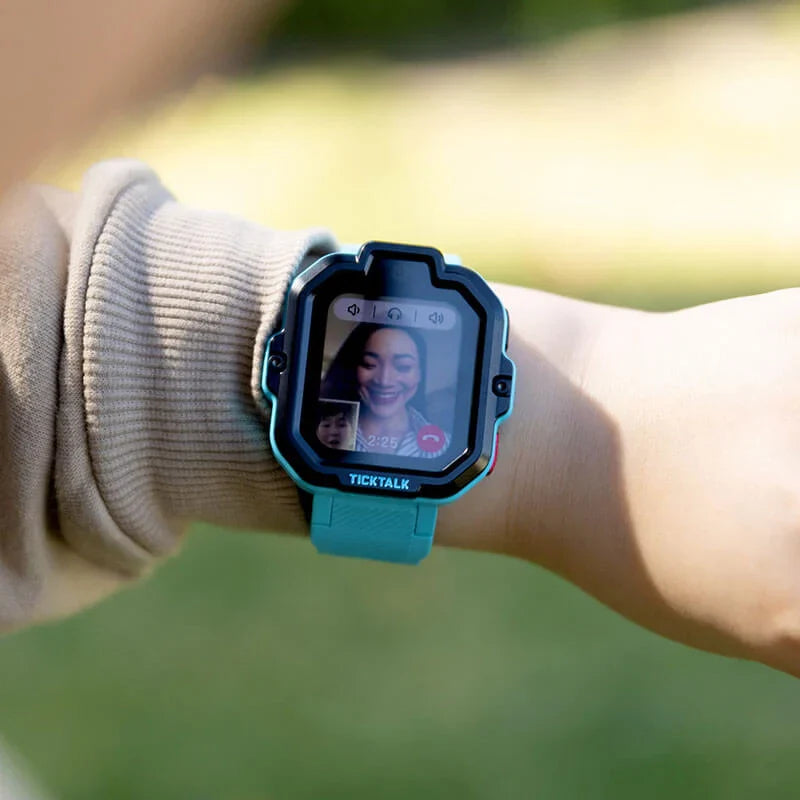
The after-school hours represent a critical window in every parent's day. Between the final bell and the moment your child walks through the door, questions multiply. Did they make it to their friend's house? Are they still at soccer practice? Did they remember to go to their tutor? For parents navigating the balance between fostering independence and maintaining safety, these hours can feel like a communication blackout.
The traditional solution has been to hand children smartphones, but this approach introduces a host of new concerns. Unrestricted internet access, social media exposure, cyberbullying risks, and screen addiction are just a few of the challenges that come with giving young children full-featured phones. Parents find themselves caught between two uncomfortable options: remain disconnected from their child's whereabouts or expose them to digital risks they're not developmentally ready to handle.
This guide explains practical, technology‑forward ways to know where your child is after school, how to reach them in an emergency, and how to do it all without handing over a full smartphone. It reflects TickTalk’s experience building kids’ GPS smartwatches that focus on safety, communication, and healthy tech habits.
Understanding the After-School Communication Gap: The Transition to Independence
The elementary and middle school years mark a developmental stage where children begin testing independence. They walk home with friends, attend extracurricular activities, and spend time at peers' houses. This gradual separation is healthy and necessary for building confidence, decision-making skills, and social competence.
However, this transition creates practical challenges for parents. Unlike the structured environment of school, after-school hours involve multiple locations, changing plans, and less adult supervision. Parents need to know their child arrived safely at their destination, but they also want to avoid helicopter parenting that undermines the independence their child is developing.
The communication gap becomes particularly acute in emergency situations. A child who misses their bus, feels unsafe, or needs to change plans requires immediate access to a parent. Without a reliable communication method, minor situations can escalate into major problems.
What Parents Really Want After School: Safety, Not Surveillance
Most parents are not trying to monitor every move their child makes. What you likely want is:
- Location peace of mind so you can quickly confirm your child made it to their destination
- A reliable way to reach each other if plans change or something goes wrong
- Boundaries around technology so your child is not pulled into social media, games, or the open internet before they are ready
Traditional options do not fully solve this:
- Smartphones give location and communication, but also introduce distractions, social media, and content you may not be ready for.
- Basic cell phones allow calling, but usually do not offer GPS tracking or app‑based controls.
- No device at all can work for short distances or when adults are always present, but it leaves gaps once your child starts walking, biking, or carpooling independently.
A kids’ GPS smartwatch, like TickTalk, is designed to sit in the middle. It gives your child a way to contact you and lets you see where they are, while keeping out the parts of smartphones that worry many families.
What a kids’ GPS smartwatch actually does
A dedicated kids’ smartwatch with GPS typically offers:
- Real‑time location tracking through GPS, Wi‑Fi, and cellular networks
- A secure parent app where you can see your child’s location on a map
- Two‑way calling and messaging with parent‑approved contacts
- Emergency SOS features your child can trigger with a single button
- No open internet or social media, so your child is not exposed to adult content or online strangers
TickTalk’s smartwatches are designed as standalone devices that work like a kid‑safe phone on their wrist. Your child does not need a smartphone of their own. You manage everything from your parent app.
Why a smartwatch is different from a phone
A kids’ smartwatch is:
- Worn, not carried, so it is harder to lose and easier to access in an emergency
- Purpose‑built for safety and communication, not entertainment
- Controlled by parents, with settings for contacts, features, and usage
This makes it a strong option for parents who want to track location and stay connected, but are not ready for the complexity and risks of a full smartphone.
3. What Is the Most Reliable Way to Track Your Child’s Location?
“Safe” location tracking is about more than just seeing a dot on a map. It includes accuracy, privacy, and how the device fits into your child’s daily life.
Key safety criteria to look for
- Accuracy and reliability Look for devices that use multiple locating methods such as GPS, Wi‑Fi, and cellular networks. This helps improve accuracy in different environments like indoors, in dense neighborhoods, or on school campuses.
-
Real‑time updates
For after‑school safety, you want to be able to open your app and see where your child is now, not where they were an hour ago. -
Strong privacy protections
Your child’s location data should be encrypted and only visible to approved caregivers. The device should be designed for children, with data practices that respect child privacy regulations. -
Parent‑controlled access
Only trusted adults should be able to see your child’s location or contact them. Look for systems where parents approve every contact and manage permissions from a secure app. -
No unnecessary exposure to the internet
If your main goal is safety, you do not need open web browsing, social media, or app stores. Keeping those off the device reduces risk.
TickTalk’s kids’ smartwatches are built around these principles. They combine real‑time GPS tracking with parent‑only access and no open internet, so location tools support safety without pulling your child into adult online spaces.
4. Real‑Time Tracking Without a Smartphone: How It Works
Many parents ask, “Can I track my child in real time without a smartphone?” The answer is yes, if you use a device that has its own cellular connection.
Standalone devices with built‑in cellular
A kids’ smartwatch like TickTalk includes:
- A built‑in SIM and 4G LTE connection, so it can send location data and handle calls on its own
- A companion parent app on your phone, where you see your child’s live location and manage settings
Your child does not need a phone. The watch connects directly to the cellular network, and you connect to the watch through your app.
What “real‑time” looks like in everyday life
With real‑time tracking, you can:
- Check that your child left school on time and is moving along their usual route
- Confirm they arrived at after‑school care, practice, or a friend’s house
- See their location if pickup plans change or a bus is delayed
- Quickly locate them in a crowded event or unfamiliar place
TickTalk’s smartwatches are designed to provide live location updates through the parent app, so you can check in as needed instead of constantly calling or texting.
Wearable GPS Devices for Kids: Why a Smartwatch Works Well
If you are wondering, “Is there a wearable GPS with real‑time location updates for parents to track their children?” a kids’ smartwatch is one of the most practical options.
Why a smartwatch is more practical than a tracker in a backpack
Some families consider small GPS trackers that clip to a backpack or go in a pocket. These can work, but they have limitations:
- Backpacks can be left in a classroom or on a bus
- Pockets can be emptied or forgotten
- Trackers often do not allow two‑way communication, so your child cannot easily call you
A smartwatch solves these issues:
- It is worn on the wrist, so it stays with your child
- It combines GPS tracking with calling and messaging, so you can both reach each other
- It is designed to be durable and kid‑friendly, with simple controls and a secure strap
TickTalk’s kids’ smartwatches are built as all‑in‑one devices. They give parents real‑time GPS tracking and give kids a simple, wearable way to stay connected.
Keeping Kids Off the Internet While Still Tracking Their Location
Another common concern is, “How can parents keep their kids off the internet but still be able to track their location?”
The key is choosing a device that separates communication and safety from general internet access.
Why “no internet” is a positive feature
For younger children, having no open internet on their device can be an advantage:
- No exposure to adult content or unsafe websites
- No social media pressure or contact from strangers
- Fewer distractions from schoolwork, sleep, and family time
TickTalk’s smartwatches are intentionally designed without open web browsing or social media apps. They focus on:
- GPS location tracking
- Calling and messaging with approved contacts
- Tools that support routines, like alarms and reminders
This gives parents the ability to track location and stay in touch, while keeping the online experience tightly controlled and age‑appropriate.
Building healthy tech habits early
Starting with a kids’ smartwatch instead of a smartphone can help your child learn:
- That technology is a tool for safety and communication, not constant entertainment
- How to use devices responsibly, like charging regularly and responding to messages
- That parents set boundaries around who they can contact and when they can use their device
TickTalk’s approach is to support families in building these habits before a full smartphone becomes necessary.
Emergency Communication Without a Phone
Many parents say, “I want to give my child a device to contact me in case of emergencies but I do not want to give them a phone. Are there any alternatives?”
A kids’ smartwatch is one of the most effective emergency communication tools for children who are not ready for a smartphone.
What makes a good emergency device for kids
For emergencies, you want a device that is:
- Always with your child and easy to access quickly
- Simple to use under stress, with clear buttons and minimal steps
- Able to reach you directly, not just send a notification
- Durable and water‑resistant, so it works in real life, not just ideal conditions
TickTalk’s smartwatches are designed with these needs in mind.
How SOS and emergency calling typically work
On a kids’ smartwatch like TickTalk, emergency features usually include:
- An SOS button your child can press and hold to trigger an alert
- Automatic calling to a sequence of parent‑approved emergency contacts
- Location sharing with caregivers when an SOS is activated
This means that if your child feels unsafe walking home, gets separated from a group, or faces an unexpected situation, they can reach you quickly without needing to unlock a phone, find an app, or remember a number.
Everyday examples of emergency situations
Here are a few ways families use a kids’ smartwatch as an emergency device:
- Your child is late leaving school and the bus has already gone. They use the watch to call you and explain what happened.
- A practice is canceled early and your child needs a ride. They send you a quick voice message from the watch.
- Your child feels uncomfortable at a friend’s house and wants to come home. They use the SOS feature or call you directly.
In each case, the watch gives your child a direct line to you without the complexity of a smartphone.
How TickTalk Supports After‑School Safety and Communication
TickTalk focuses specifically on helping families stay connected and safe during the times when kids are gaining independence, like after school.
Designed for kids, controlled by parents
TickTalk’s kids’ smartwatches are built as first devices for children, with:
- Real‑time GPS tracking so you can see where your child is from your parent app
- Voice and video calling so you can talk face‑to‑face when needed
- Messaging options like voice messages and text, managed through parent‑approved contacts
- Emergency SOS features that alert caregivers and share location
- No open internet or social media, to keep the experience focused on safety and communication
Parents manage contacts, features, and settings from the TickTalk app, which gives you control over who can reach your child and how the watch is used.
Built for everyday school life
TickTalk’s smartwatches are designed to fit into a typical school day:
- School‑friendly modes so the watch stays quiet and distraction‑free during class
- Durable design that can handle playgrounds, sports, and everyday wear
- Battery life built to last through long school days and after‑school activities
This makes the watch a practical tool your child can rely on from morning drop‑off to evening pickup.
A balanced approach to independence
TickTalk’s perspective is that technology should support your parenting, not replace it. A kids’ smartwatch is not about constant surveillance. It is about:
- Giving your child age‑appropriate independence with a safety net
- Allowing you to check in when it matters most, like after school or during transitions
- Teaching your child that staying connected and communicating clearly is part of being responsible
By focusing on safety, communication, and healthy tech habits, TickTalk helps families navigate the years between “always together” and “full smartphone” with more confidence.
Putting It All Together: A Simple After‑School Safety Plan
To make the most of any kids’ GPS smartwatch, it helps to create a clear plan with your child.
Set shared expectations
Talk through:
- When they should contact you (leaving school, arriving at practice, if plans change)
- What to do in an emergency (how to use the SOS button, who it calls, where to wait for you)
- How to care for the device (charging it nightly, wearing it properly, not removing it without permission)
Use location as a backup, not a replacement for trust
Explain that:
- The watch is there to keep them safe, not to catch them doing something wrong
- You will check their location when needed, especially during transitions
- As they show responsibility, you may adjust how often you check in
Review and adjust as your child grows
As your child becomes more independent, you can:
- Update approved contacts as their circle expands
- Adjust rules for calling and messaging
- Revisit emergency plans as their activities change
TickTalk’s smartwatches are built to grow with your child through these stages, giving you tools to adapt without jumping straight to a full smartphone.
Staying Connected Without Compromising Safety in 2026
You don’t have to choose between giving your child independence and keeping them safe. With the right approach, it’s possible to stay connected while avoiding the risks that come with social media and open internet access. By focusing on communication, limiting contacts to trusted people, and setting clear family expectations, you can give your child the tools they need without unnecessary exposure.
Devices like TickTalk are built around this balance. They provide calling, messaging, and real-time GPS tracking, while intentionally leaving out social media, internet browsing, and app stores. This allows children to stay in touch with family and close friends, while parents maintain visibility and control.
For many families, TickTalk serves as a practical first step, bridging the gap between no device and a future smartphone. It supports everyday coordination, after-school safety, and emergency communication, all within a controlled, age-appropriate environment.
FAQs: Keeping your Children on Track & Common Parent Questions
To close, here are concise answers to the most frequent questions parents ask about after‑school safety and tracking.
How can I make sure I know where my child is after school?
Parents can keep kids connected by focusing on communication tools instead of social platforms. Devices like TickTalk smartwatches allow children to call, message, and share updates with a small group of parent-approved contacts, without exposure to social media or the open internet. This approach supports healthier development by reducing risks like online strangers, inappropriate content, and constant comparison. By separating connection from platforms, families can give children independence while maintaining control over who they communicate with and how.
How can I track my child’s location without giving them a phone?
Devices like TickTalk smartwatches include built-in GPS tracking that allows parents to view real-time location and location history through a companion app. Many also support features like geofencing alerts, which notify parents when a child enters or leaves a specific area. This provides peace of mind during times like after school or activities, allowing children to move independently while parents maintain visibility, without needing to introduce a full smartphone.
Can I track my child in real time without a smartphone?
Yes. Devices like TickTalk smartwatches include built-in cellular connectivity and GPS, allowing parents to view their child’s real-time location through a secure parent app while the child uses only the watch. Because TickTalk operates as a standalone device, your child does not need a smartphone to stay connected or be located. This setup supports independence while giving parents reliable visibility during key moments like after school, activities, or travel between locations.
Is there a wearable GPS with real‑time location updates for parents to track their children?
Yes. Devices like TickTalk smartwatches combine real-time GPS location tracking with calling and messaging in a wearable format designed for kids. Because the watch is worn on the wrist, it stays with your child throughout the day, making location tracking more reliable than devices kept in a backpack or pocket. TickTalk also allows parents to view live location updates through a secure app while limiting communication to approved contacts only.
I want to give my child a device to contact me in case of emergencies but I do not want to give them a phone. Are there any alternatives?
Yes. A kids’ smartwatch like TickTalk is designed exactly for this need. It lets your child call, message, and send SOS alerts, while you track their location and control who can contact them, all without giving them a traditional smartphone.
Share:
How to Protect Your Kids From Digital Risks: An Internet Safety Guide for Parents
The Best First Device for Kids That Isn't a Smartphone (And Why That's a Good Thing)